Description
Now with Checkout Blocks support!
A PO number is a reference. The PO document is the authorization. It is the thing your accounting team needs on file before shipping $20,000 of goods on credit.
This add-on adds a file upload to the Purchase Order payment method, so the buyer attaches their signed PO at the moment they check out instead of you chasing it by email three days later. Requires the WooCommerce Purchase Order Payment Gateway.
What it does
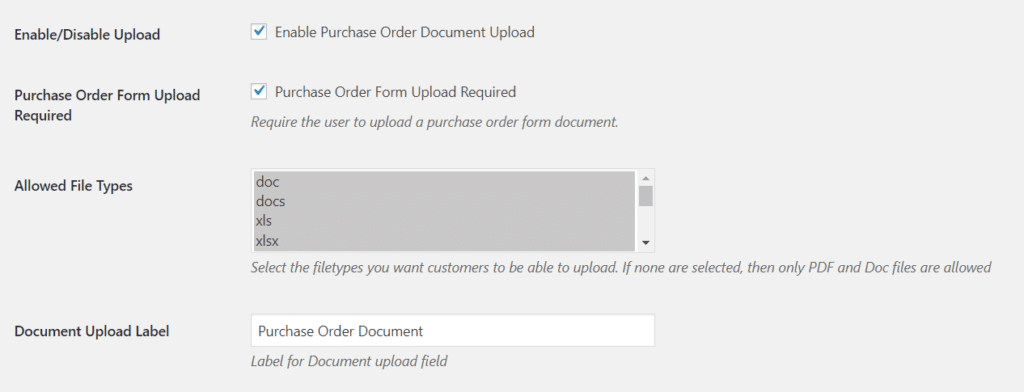
- Adds a file upload field to the Purchase Order payment method at checkout
- Make the upload optional or required. Required means no PO document, no order
- Restrict accepted file types (PDF only, or PDF plus images and spreadsheets, your call)
- Your own label and help text on the upload field
- The uploaded file is attached to the order and available from the admin order screen
- Block checkout support and HPOS compatible, with graceful fallback to legacy order storage
Who buys this
Suppliers to schools, hospitals, municipalities and enterprise procurement. Anywhere the buyer’s own policy requires a signed PO on file before fulfilment. If you’ve ever shipped against a PO number and then couldn’t find the paperwork during a dispute, this is the fix.
FAQ
Can I make the upload required? Yes. When set to required, the order can’t be placed without a file attached. Which file types are supported? You choose. Restrict to PDF, or allow images and documents. Where do I find the uploaded file? On the admin order screen, attached to the order. Does it work with the new block checkout? Yes.


High Performance Order Storage (HPOS) Support
As of WooCommerce v8.0, HPOS has been the default. This stores order data in tables separate from the standard wp_post tables. If you’re still using Legacy Orders, this plugin will gracefully fall back to the legacy order storage, and when you migrate to HPOS, it will gracefully migrate the data as needed. 30